RocketReach vs Apollo: 10 Key Feature Tests & 2026 Comparison

RocketReach and Apollo.io are two of the most compared B2B prospecting tools right now.
If you’re reading this, you’ve probably used one of them already and want to know if the other one is better for your outbound setup.
I tested both by building the same lead list, checking how many verified emails I got, and seeing how credits were used.
I also looked at filters, intent data, and export limits.
In this RocketReach vs Apollo comparison, I break down:
- Database size and coverage
- Email and phone accuracy
- Search filters and intent data
- Outreach features
- CRM and integrations
- Pricing and credit usage
This is based on how both tools behave in real outbound work.
TL;DR - RocketReach vs Apollo: Which One Should You Pick?
This comparison breaks down where Apollo.io and RocketReach stand, feature by feature.
I’ll also include a stronger alternative if your main concern is better ICP targeting, cleaner enrichment, and exporting directly into your outreach stack.
Here’s a quick breakdown:
I. Leadsforge: Best if you want ICP-based search, waterfall enrichment across multiple sources, and direct export into Salesforge.
(Starts at $49/month with 2,000 export credits. Unused credits roll over.)
II. Apollo: Best if you want database + built-in sequences + dialer inside one system.
(Starts around $59/month per user.)
III. RocketReach: Best if you mainly need verified emails and phone numbers for export into your existing outreach tool.
(Starts around $49/month for lookup-based plans.)
RocketReach vs Apollo: 10 Feature-by-Feature Comparison
Now let’s get into the details.
I compared Apollo.io and RocketReach across the key areas that matter most when choosing a prospecting tool.
Let’s start with the first one.
1. B2B Database Size and Coverage
The size of a prospecting database decides how many potential customers you can actually reach.
A bigger database usually means better coverage across industries, roles, and countries.
So I started by comparing Apollo.io and RocketReach on pure database scale and regional strength.
I. Apollo.io - 275M+ Contacts
Apollo gives access to:
- 275M+ contacts
- 73M+ companies
When I ran searches for US-based tech and SaaS roles, the results were strong and easy to filter.
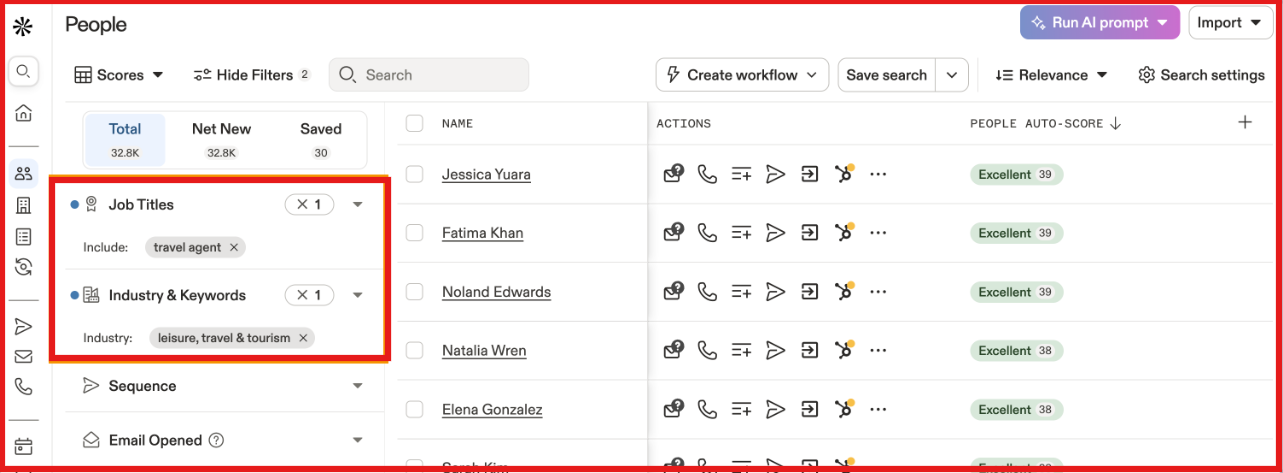
Apollo feels structured, especially for mid-to-large companies in English-speaking markets.
But when I tested searches in smaller or emerging regions, the available contact count dropped compared to US searches.
II. RocketReach - 700M+ Profiles
RocketReach reports:
- 700M+ professional profiles
- 35M+ companies
When I searched across multiple regions, it returned broader global results.
The focus is clearly on providing large-scale contact data, with engagement features.
RocketReach clearly has the larger database by volume.
Apollo’s database is smaller, but I find it more integrated into a full outbound workflow.
If I’m choosing purely based on database size, I would lean toward RocketReach.
2. Email & Phone Accuracy
Database size matters. But for me, accuracy matters more.
If emails bounce or phone numbers don’t connect, the database size doesn’t help.
So I tested both tools with real prospect lists.
I. Apollo.io
Apollo claims around 91% email accuracy.
In my tests targeting US-based VP and Director roles, email deliverability was generally solid.
Most campaigns went through without major bounce issues.
Phone numbers were less consistent.
Apollo charges 5 credits per phone reveal, and some numbers led to outdated lines.
I also noticed this frustration reflected in G2 reviews.
Apollo does refund bounced emails, but only if you send them through Apollo’s own platform.
If I export the data and use another outreach tool, that refund doesn’t apply.
And phone credits are not refunded at all.
So email accuracy feels decent. Phone accuracy feels weaker.
II. RocketReach
RocketReach reports up to 98% accuracy for A-grade verified emails.
In my experience, email data was consistently reliable. Most contacts I pulled were usable, especially for decision-makers.
There were still occasional outdated emails, but fewer than I expected at scale.
Phone data isn’t perfect either, but RocketReach does clearly state its fill rates and verification standards, which I appreciate.
On G2, users repeatedly mention strong email reliability, though some outdated records still exist.

When I’m about to export 500 or 1,000 contacts, I don’t want to discover bad emails after I’ve already sent a campaign.
That’s why I use Leadsforge when accuracy is the priority.
Before I export anything, it checks multiple sources to find verified data.
With Leadsforge, I can choose exactly what I need, email, phone, or LinkedIn.
It pulls from multiple sources before anything is exported.
If verified data isn’t found, it simply doesn’t make it into my list.
I’m not relying on refunds after a bounce.
I’m reducing the bounce risk before I ever send.
When clean data is non-negotiable, I prefer Leadsforge.
3. Prospecting Filters and Search
The quality of your prospecting filters determines whether you’re building targeted lists or generic ones.
Broad filters give you volume. Granular filters give you prospects that actually match your ICP.
Here’s how each tool handles search and filtering.
II. Apollo.io: 65+ Filters
Apollo offers 65+ search filters, and the depth is genuinely impressive.
Job title, company size, industry, tech stack, revenue, funding, seniority, and more.
When I needed to find CTOs at Series B+ companies using Kubernetes in the Bay Area, Apollo let me build that exact search.
It also offers saved searches and search alerts, which are useful if you’re prospecting for the same ICP regularly.
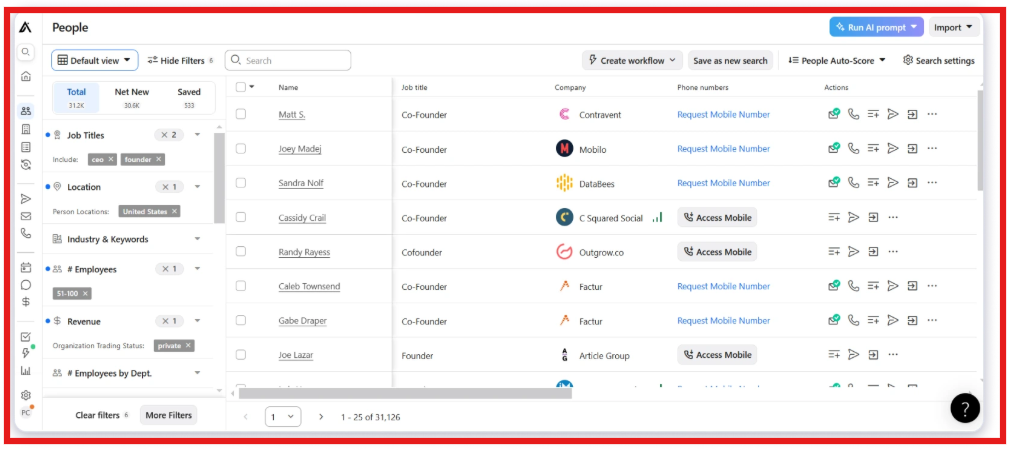
But the most powerful filters, like tech stack, buying intent signals, and hiring activity are locked behind higher-paid plans.
On the free or Basic tier, you’re working with a fraction of Apollo’s actual filtering power.
II. RocketReach: 100+ Filters
RocketReach offers 100+ filters covering role, department, management level, location, skills, and technologies.
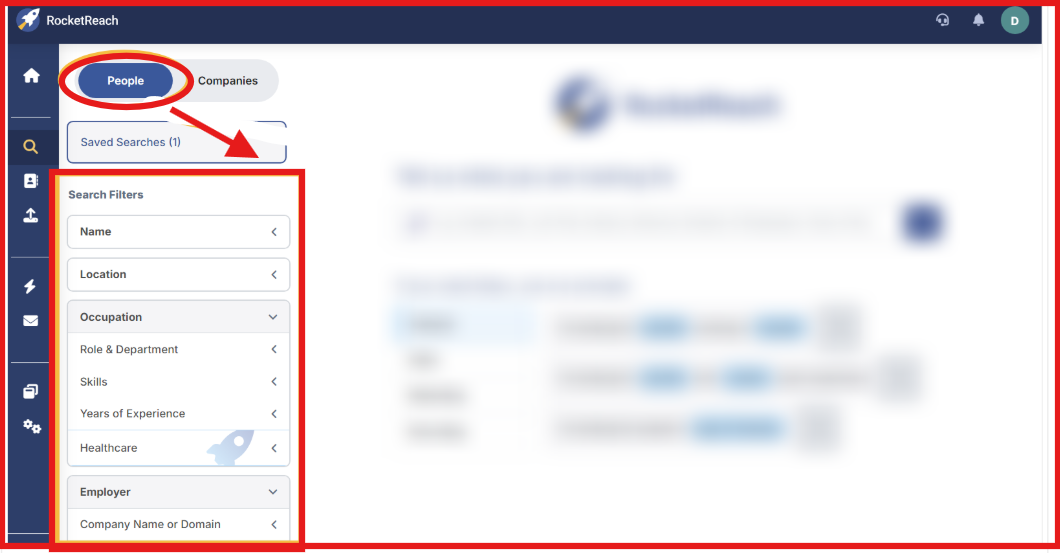
Alt text: Rocketreach advanced filters
Search is fast and simple, making it easy to build lists quickly.
However, for highly layered ICP targeting with multiple stacked criteria, it feels less structured than Apollo.
Apollo offers deeper, more layered filtering for precise ICP targeting.
RocketReach is fast and broad, but Apollo gives more control for structured prospecting.
If I’m choosing based on advanced filtering alone, I’d choose Apollo.
4. Outreach and Engagement Capabilities
Finding prospects is step one.
What matters next is whether you can actually reach them from the same platform.
Here’s how each tool handles outreach once you’ve built your list.
I. Apollo.io: Full Outreach Suite
Apollo offers a built-in outreach system that includes email sequences and a dialer with call recording. It also includes LinkedIn task steps, meeting scheduling, and basic automation.
I ran multi-step sequences using email and LinkedIn tasks, and the workflow worked well for smaller campaigns.
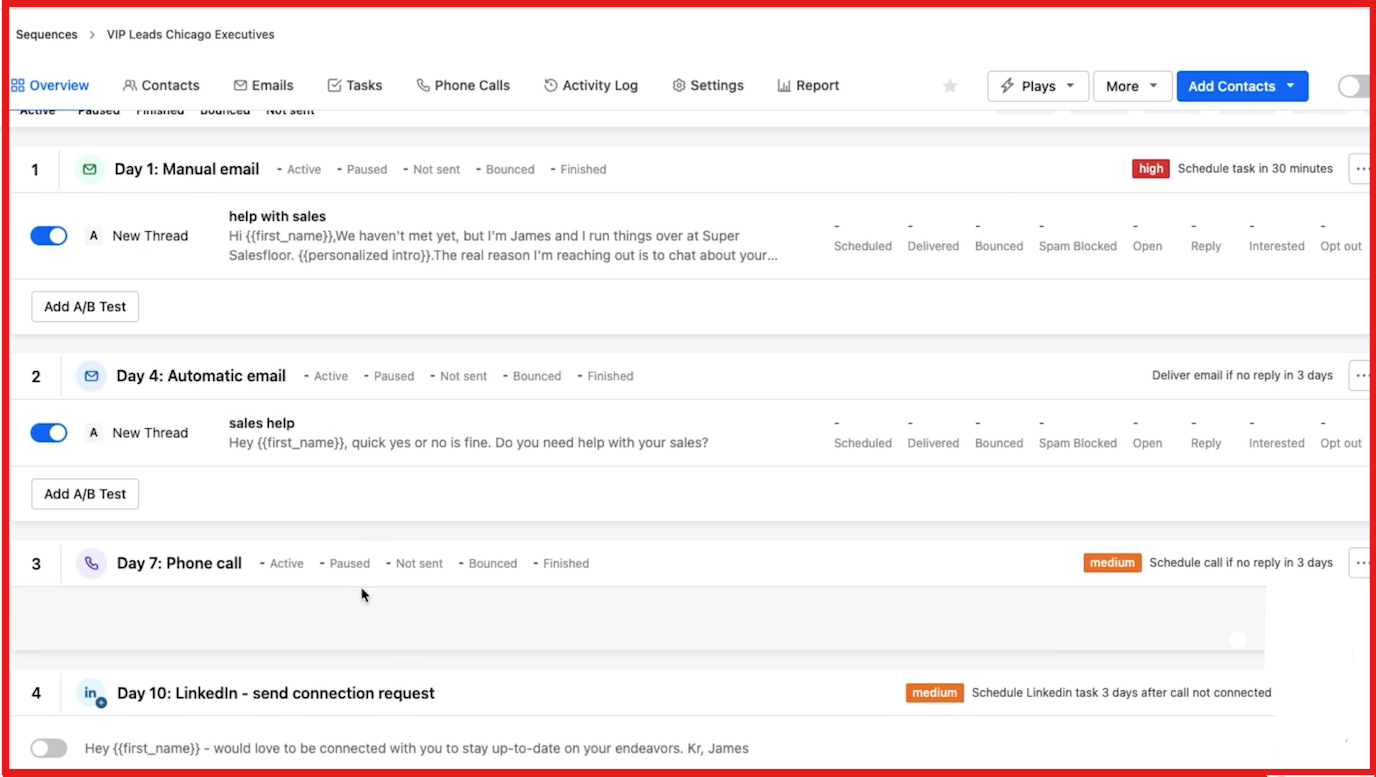
For teams that want data and outreach in one place, Apollo covers a lot.
When I scale volume, I need to configure domains and limits properly to protect deliverability.
II. RocketReach: Outreach Is Not the Core Focus
RocketReach mainly focuses on providing contact data.
It allows simple email outreach and sequence.
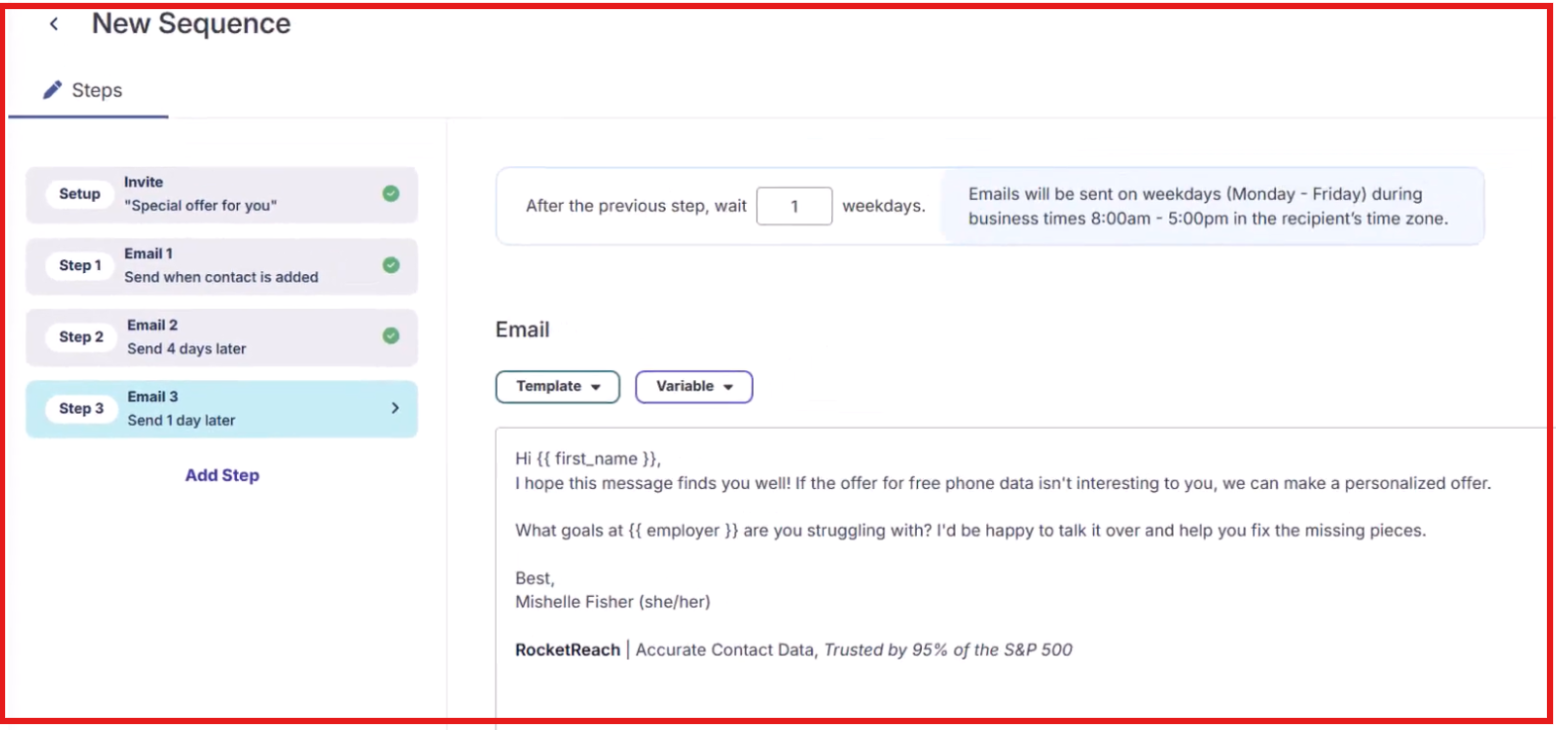
For light outreach, it works fine.
For running full outbound campaigns at scale, most teams will need a separate engagement tool.
When looking for an all-in-one outbound platform, Apollo is the stronger choice.
5. LinkedIn Chrome Extension
When I research prospects, I spend a lot of time on LinkedIn and company websites.
So the Chrome extension matters.
It decides how quickly I can find contact details and take action.
Here’s how both tools handle it.
I. Apollo.io: Built for Workflow
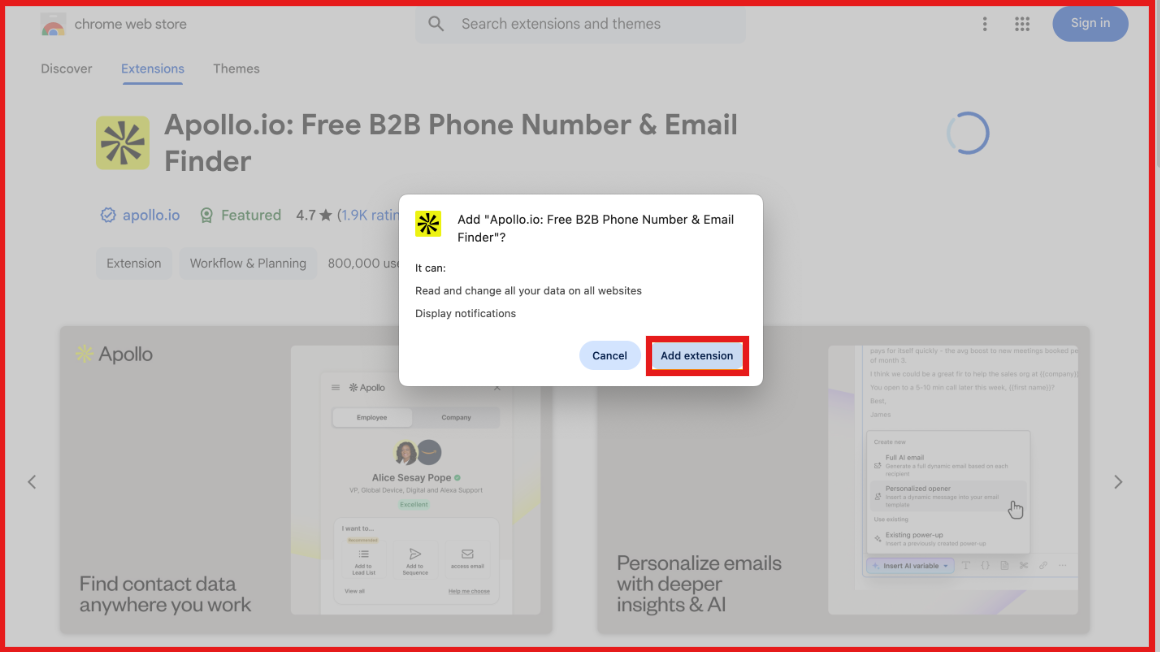
Apollo’s Chrome extension works inside Gmail, Google Calendar, Salesforce, HubSpot, LinkedIn, and other websites.
From LinkedIn, I can find verified emails and phone numbers, add contacts to lists, and push them into sequences.
Inside Gmail, I can track emails, use templates, insert meeting links, and log emails to Salesforce if it’s connected.
The extension connects directly to Apollo’s platform. I can move from profile to outreach without switching tools.
II. RocketReach: Simple Contact Lookup
RocketReach’s Chrome extension focuses on quick contact discovery.
It works on LinkedIn and company websites. I can reveal emails and view company information in a few clicks.
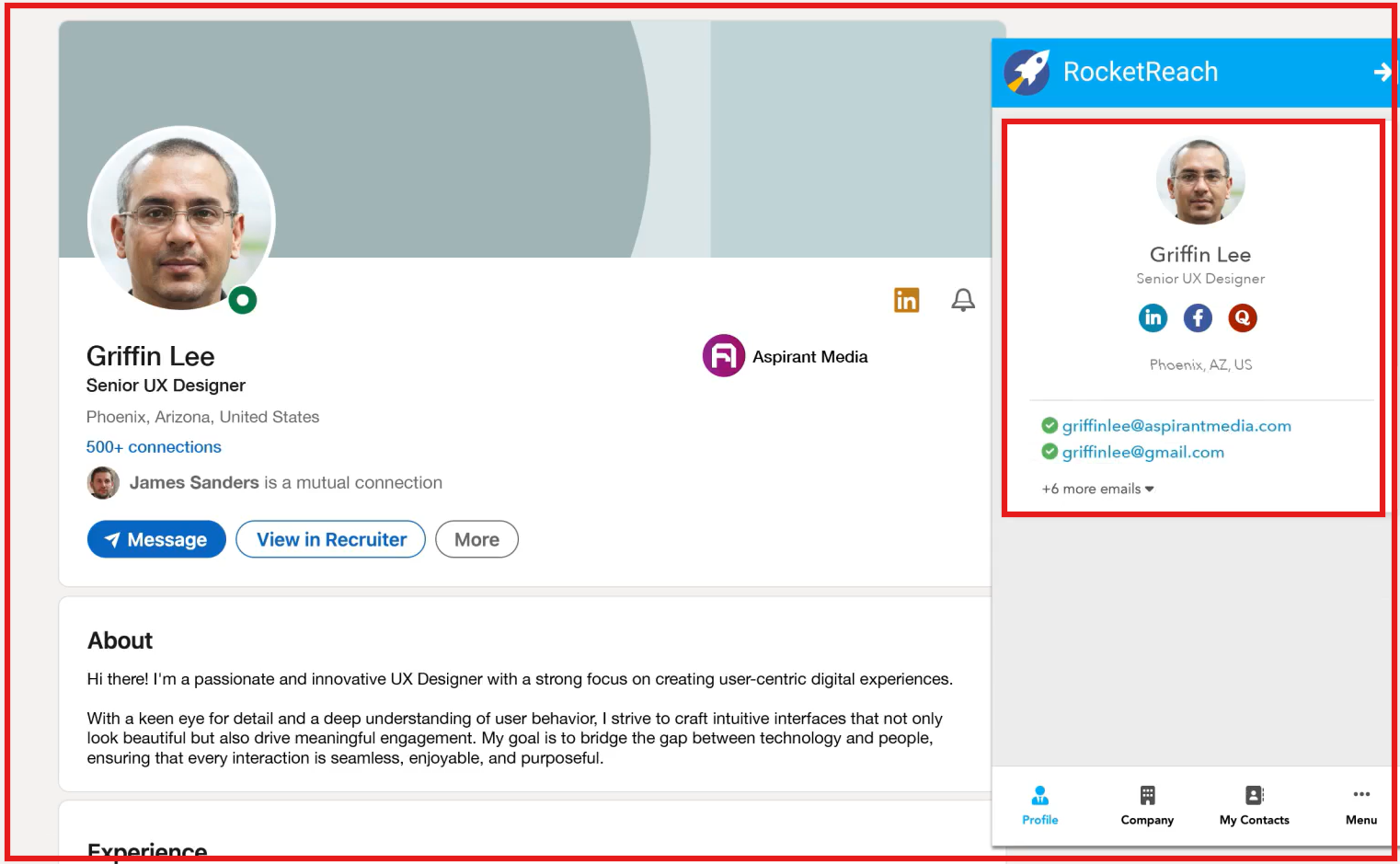
Emails are validated in real time, and the interface is simple.
It’s built mainly for fast data lookup, not full outreach workflow control.
So, if I have to choose one based on the Chrome extension alone, I prefer Apollo because it lets me move from research to outreach.
6. Intent Data
Finding contacts is one step.
Knowing who is actively researching your solution makes outreach sharper.
That’s where intent data matters.
Here’s how both tools handle it.
I. Apollo.io: Built-In Buying Intent
Apollo includes buying intent filters inside the platform.
I can combine intent topics with job title, company size, industry, and other filters.
That helps me narrow down accounts already showing interest in related tools.
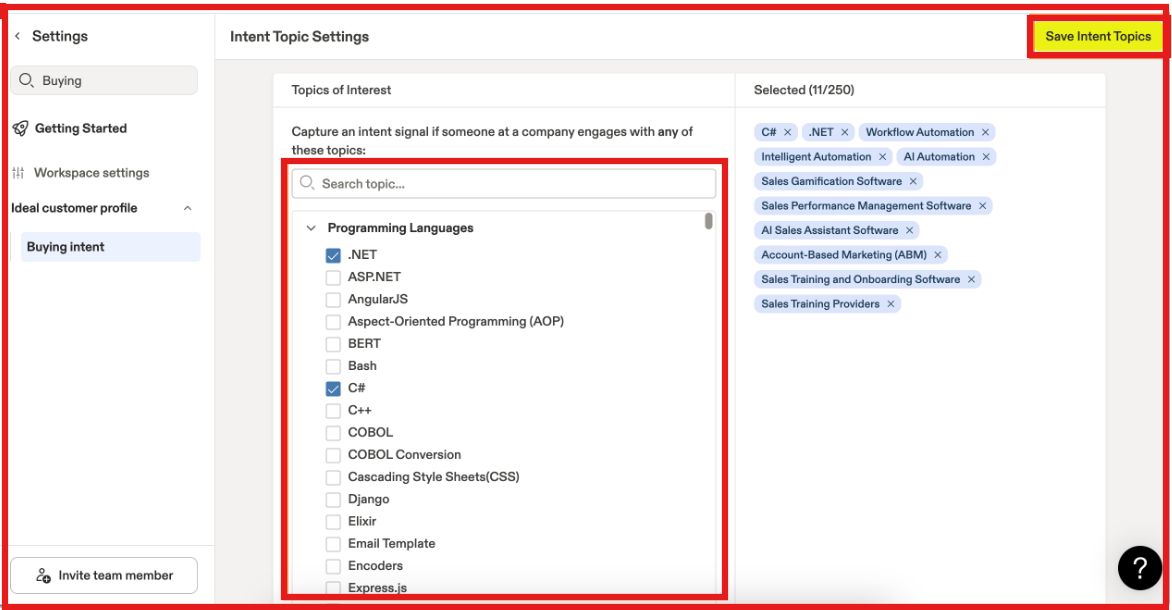
Advanced intent features are stronger on higher plans.
For structured outbound inside one system, Apollo keeps intent and outreach connected.
II. RocketReach: Broad Intent Topic Coverage
RocketReach also offers B2B intent data.
It provides access to thousands of intent topics and lets me filter companies based on research signals.
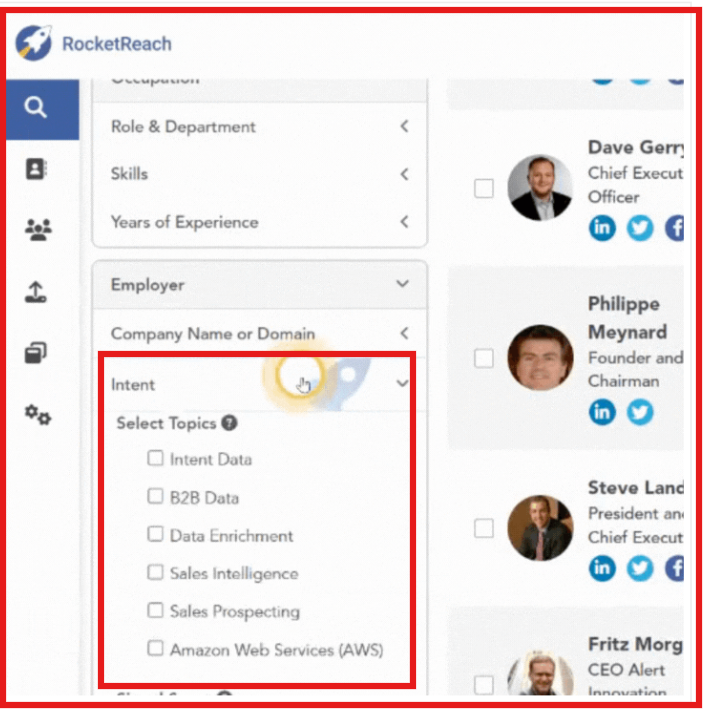
Intent features are available on higher-tier plans.
RocketReach positions intent as a way to prioritize accounts before outreach.
When intent becomes central to my targeting, I usually go one step further.
I move that list into Leadsforge before launching sequences through Salesforge.
Instead of just topic-level intent, I can search for real buying signals.
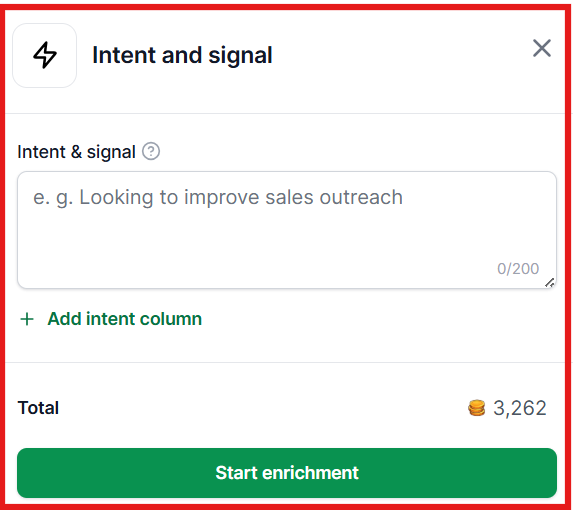
For example:
- Looking for lead generation support
- Attending SaaS events
- Launching new products
- Expanding into new markets
It analyzes public sources and returns a clear yes or no match with supporting details.
I build the list in Leadsforge first, then move it into Salesforge to launch outreach in a structured way.
7. Sales Intelligence
Finding contact data is step one.
What matters next is how much account context you get before writing the first email.
Sales intelligence decides whether I’m guessing or writing with real company insight.
Here’s how each tool handles it.
I. Apollo.io: Deep Intelligence Inside One System
Apollo gives detailed company profiles inside the platform.
When I used it for structured outbound, I could see company size, funding data, hiring activity, and enrichment details in one place.
What I liked was that
I could move from research to sequence launch without switching tools.
I also had pipeline tracking and reporting in the same system.
For teams managing ongoing SDR workflows, that setup feels organized.
Where it felt heavier was when I only needed quick company research.
If I just wanted fast validation, the full pipeline layer felt like more than I needed.
II. RocketReach: Strong Data, Lighter Account Layer
RocketReach focuses on accurate contact and company data at scale.
When I used it for prospect discovery, the global coverage was broad and fast.
Company pages gave me firmographic data quickly, and AI suggestions helped surface similar contacts.
For building large lists across regions, it worked well.
But after finding contacts, I still needed a separate tool to manage pipeline and deals.
It is strong for discovery, not full account management.
When sales intelligence needs to connect directly to outreach and pipeline tracking, I’d choose Apollo.
8. Integrations
A prospecting tool is only useful if it connects to the rest of the sales stack.
CRM sync, engagement platforms, and API access decide how smoothly data moves between systems.
Here’s how each platform handles integrations.
I. Apollo.io: Broadest Ecosystem
Apollo has one of the widest integration libraries in this comparison, with over 100 native integrations.
CRM sync covers Salesforce, HubSpot, Pipedrive, and many others.
It also connects directly with sales engagement tools like Outreach and Salesloft, along with full API access.
If a team relies on Outreach or Salesloft for sequencing, Apollo is likely to have a native connector already available.
II. RocketReach: Strong CRM and Engagement Connections
RocketReach integrates with Salesforce, HubSpot, Outreach, Salesloft, and Bullhorn.
Quick Sync allows leads to move directly from RocketReach into Outreach or Salesloft sequences.
It also connects through Zapier, which expands integration options across thousands of tools.
API access is available for custom workflows.
RocketReach focuses on making data transfer into engagement platforms simple and fast.
For broader native integrations and deeper CRM ecosystem support, Apollo is the stronger choice.
9. Technographics
Knowing which tools a company uses helps narrow down the right accounts.
If I’m selling to companies using a specific stack, technographic filters save time.
Here’s how each platform handles it.
I. Apollo.io: Large Technology Library
Apollo supports 1,500+ technology options in its filter. It collects this data from web scraping and third-party sources.
I can search companies based on the exact tools they use. The list is updated regularly.
Some advanced filters depend on the plan. If I need deeper filtering, I have to upgrade.
II. RocketReach: Simple Technology Filter
RocketReach includes a “Technologies” filter when searching companies.
Users can select one or more technologies to find companies using them.
If I select multiple tools, the search works with OR logic.
Free and lower plans only show the first 10 results.
Full access requires a Pro plan or higher.
Companies are sorted by relevance, with exact matches shown first.
10. Pricing Comparison
Pricing in prospecting tools is rarely straightforward.
Per-user pricing and lookup caps change the real cost quickly as volume increases.
Here’s how it breaks down.
I. Apollo.io Pricing (Per User)
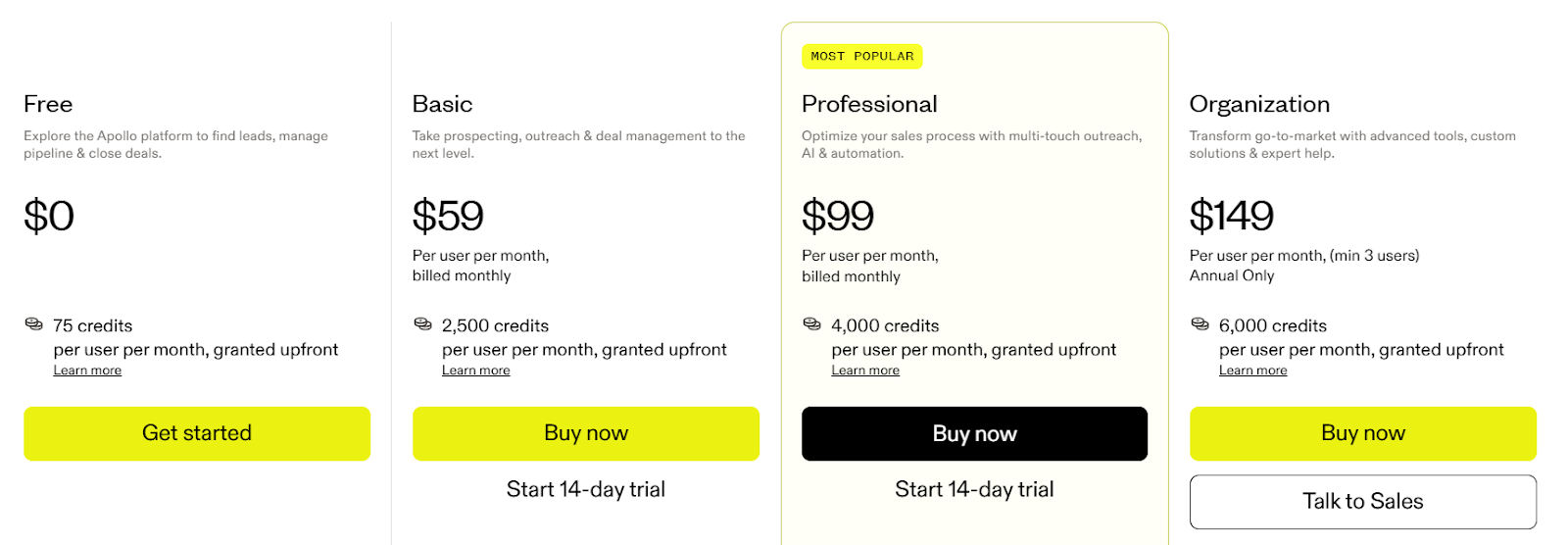
Apollo charges per user per month.
- Basic costs $59/user/month with 2,500 credits per month.
- Professional costs $99/user/month with 4,000 credits per month.
- Organization costs $149/user/month with 6,000 credits per month.
Here’s how credits works:
- 1 email = 1 credit
- 1 phone = 8 credits
If I pull 1,000 contacts with emails and phones, that’s 9,000 credits.
Even the $99 plan cannot cover that in one month.
And if I add more users, costs multiply.
II. RocketReach Pricing (Limited Monthly Lookups)
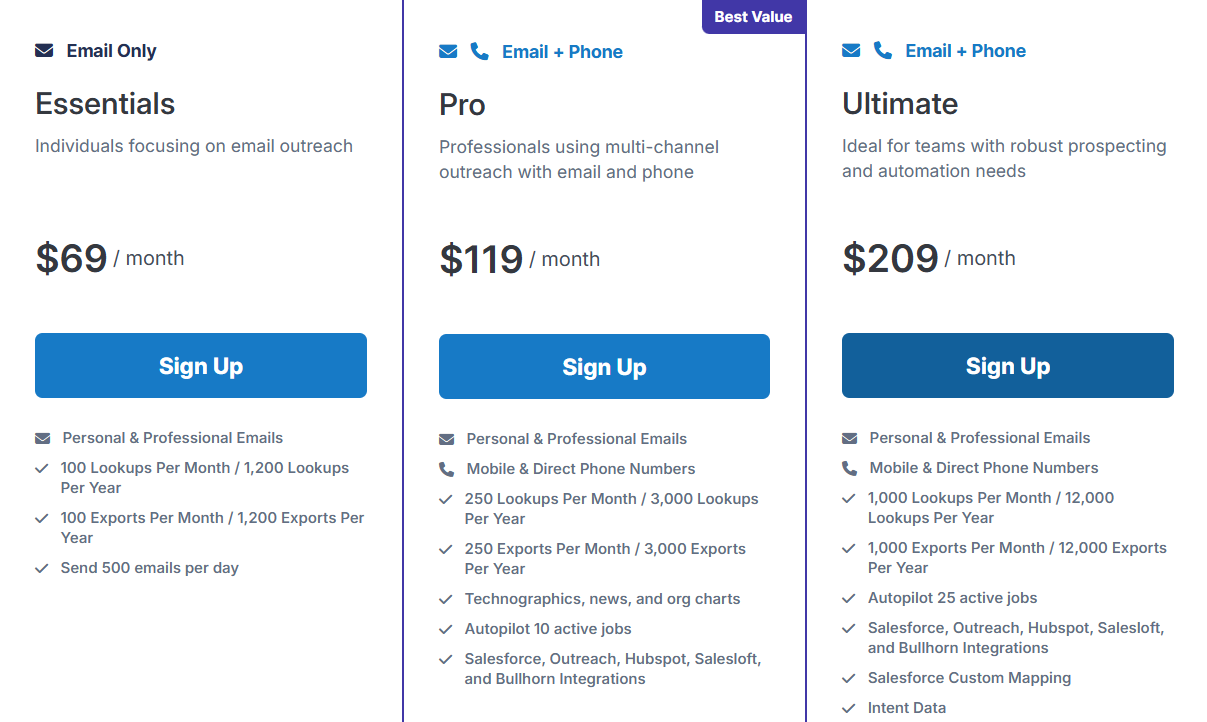
RocketReach starts at $69/month with 100 lookups.
Pro is $119/month with 250 lookups.
Ultimate is $209/month with 1,000 lookups.
If I need 1,000 contacts, I’m already at $209.
Lower tiers feel restrictive for bulk list building.
Leadsforge costs $49/month with 2,000 export credits.
That is:
- Not priced per user like Apollo
- Not capped at 100–250 lookups like RocketReach
- Unused credits never expire
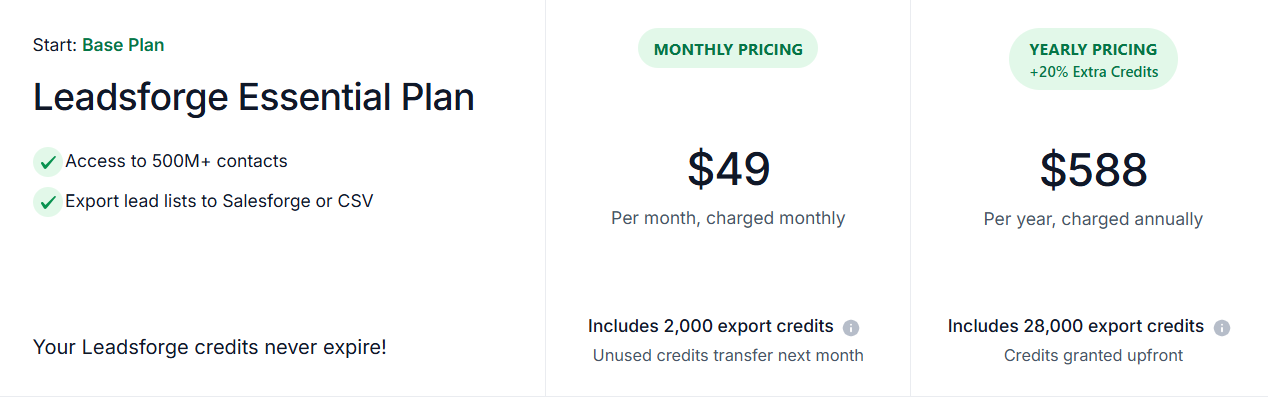
For less than Apollo Basic or RocketReach Essentials, I get more usable lead volume.
Final Verdict
If I compare everything side by side, the choice depends on what I need most.
Apollo is better if I want data, outreach, and CRM tools in one platform.
RocketReach is better if I only need contact data with a very large global database.
But when I look at cost per lead and list volume, Leadsforge gives me more usable contacts for less money.
For $49 per month, I get 2,000 export credits.
Apollo charges per user and credits run out quickly when I pull phone numbers.
RocketReach limits lookups heavily on lower plans.
But if my goal is to build larger lead lists at a lower cost, I would choose Leadsforge.
I can describe my ideal customer, generate a list, and export only the contacts I need.
Then I move that list into Salesforge and run email and LinkedIn outreach from there.
That setup gives me scale without overpaying for credits.
You can start with 100 free credits in Leadsforge and test how it performs.