
Personalized Outbound Strategy
Get The Right Outbound Strategy In Minutes
Enter your email to get a custom plan & stack recommendation for your business
It's being carefully crafted by AI
Please check your mailbox in 5 minutes
When I started running more outbound campaigns, one problem kept coming up.
I needed a reliable contact data tool to build lead lists faster.
Most people I spoke with recommended two tools: Lusha and RocketReach.
So I decided to test both while building lead lists for a few campaigns.
I used the same search criteria, checked email accuracy, and exported contacts to see how usable the data actually was.
Both tools promise verified emails, phone numbers, and large databases.
But once I started building real prospect lists, the differences became easier to notice.
In this Lusha vs RocketReach comparison, I’ll walk through what I found after testing both tools.
I’ll cover database size, contact accuracy, search filters, pricing, and where each tool fits best for prospecting.
Lusha and RocketReach help find emails and phone numbers for B2B prospects.
But they work a little differently when building lead lists.
If the goal is quickly finding contact details on LinkedIn, Lusha often is simpler to use.
RocketReach works better when I need larger prospect lists.
Its database includes 700M+ profiles and 60M+ companies, so searches usually return more contacts.
Both tools mainly focus on revealing contact information. Building large, targeted lists can still take extra time.
When I need faster list building based on ICP filters, I usually look at lead search platforms built for prospecting.
Tools like Leadsforge focus more on this type of workflow.
Here’s a quick comparison:
Now let’s get into the details.
I compared Lusha and RocketReach across several features that matter most when choosing a contact data tool.
Let’s start with the first one.
The size of the database decides how many prospects you can actually find.
A bigger database usually means better coverage across industries, locations, and job roles.
So the first thing I checked was how large the contact database is and how many results each tool returned.
RocketReach has one of the largest contact databases in the market.
It claims access to 700M+ professional profiles and 60M+ companies.
When I ran searches for roles like VP Sales, Marketing Directors, and Founders, RocketReach usually returned a large number of results.
This made it easier to build larger prospect lists across different industries.
RocketReach also seems to perform better when searching.
But the downside is that larger databases sometimes include outdated or incomplete contacts, so verification still matters before outreach.
Lusha provides access to 280M+ verified contacts with company data and direct phone numbers.
The database is smaller than RocketReach, but Lusha focuses more on verified contact details and direct dials.
When I searched for decision-makers in sales and marketing roles, the contact details were usually clear and easy to reveal.
Lusha also works well with LinkedIn through its Chrome extension, which makes it easier to pull contact details directly from profiles.
However, when I tried broader searches across multiple industries, the number of available contacts was often smaller compared to RocketReach.
Winner: RocketReach - Its 700M+ contact database makes it better for finding larger prospect lists.
Finding contact details is useful. But sales teams also need complete and updated data about those contacts and companies.
This is where data enrichment becomes important.
I tested how both tools enrich existing contact and company records with additional information.
Lusha focuses on automatically enriching and updating CRM records with verified B2B data.
It can update contact details such as emails, job roles, seniority, and company information as people change jobs or move companies.
Lusha also enriches company records with details like company size, industry, and other firmographic attributes.
Teams can also enrich contacts in bulk using the Lusha Bulk Person API, which works with tools like Google Sheets and CRM systems.
RocketReach also supports enrichment through its Contact Data API and Company Data API.
These APIs allow teams to enrich contact records.
This includes name, job title, company role, location, email addresses, and phone numbers.
RocketReach also provides firmographic data like company size, industry, revenue, and key executives.
The API uses the same data that powers the RocketReach search platform, which includes hundreds of millions of contacts and millions of companies.
RocketReach also claims up to 98% accuracy for A-grade emails using its AI-driven verification process.
Winner: Lusha - Its CRM-focused enrichment workflows make it better for automatically updating and maintaining contact and company data.
However, when I’m building prospect lists, I prefer tools that make enrichment easier during the search process.
Tools like Leadsforge combine lead search and data enrichment in the same workflow.
I can search for prospects and can get their emails, LinkedIn profiles, and phone numbers at the same time.
Leadsforge also uses waterfall data enrichment, which checks multiple data sources until verified contact details are found.
Because of this, I can build and enrich lead lists faster.
The quality of prospecting filters decides whether you build targeted lead lists or broad ones.
Basic filters help find contacts quickly. But more detailed filters help narrow results to prospects that actually match my ideal customer profile (ICP).
So I tested how both tools handle search and filtering.
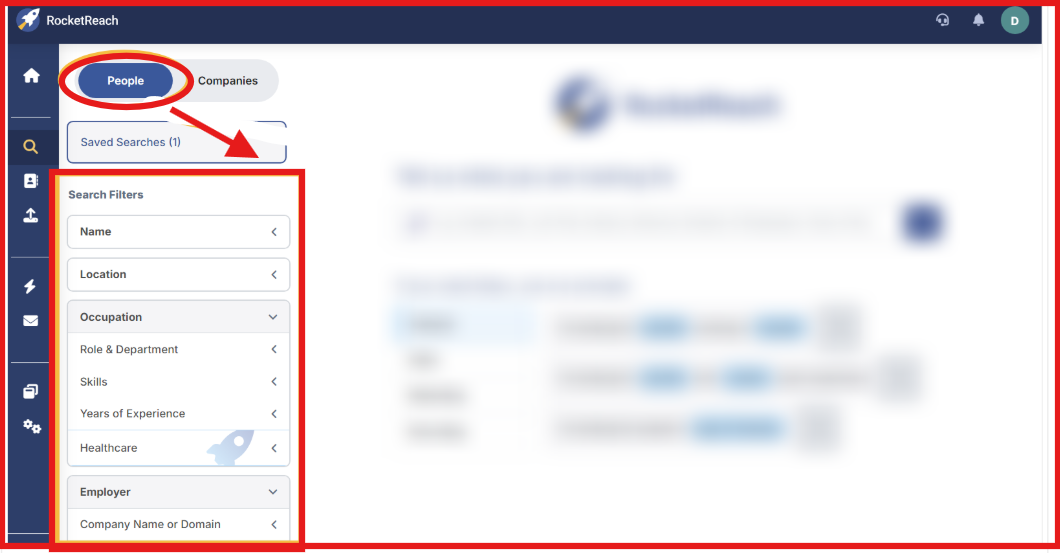
RocketReach provides several filters to help narrow prospect searches.
For example, I could search for people by job title, department, management level, and industry.
I also filtered contacts based on job changes, which helped identify people who recently moved roles.
RocketReach also supports filters such as location and technologies used by companies, which helped narrow results to more relevant prospects.
By combining multiple filters together, I was able to build more focused prospect lists.
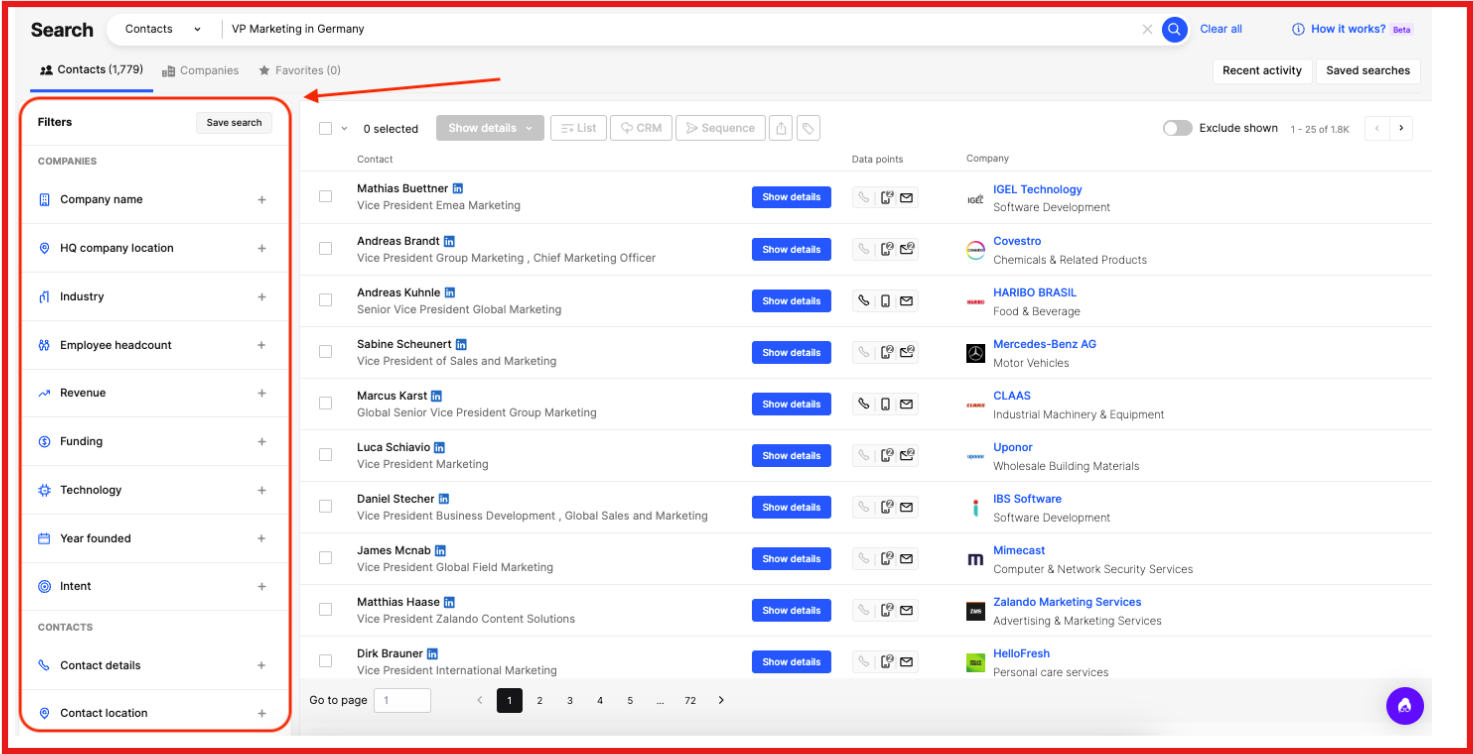
Lusha also offers a wide set of filters designed to help users reach their ideal customer profile.
I was able to filter prospects by job title, department, seniority, company size, industry, and location.
Lusha also includes filters for company revenue, funding, technologies used, and intent signals.
This helped identify companies that may be actively researching certain products.
Another useful feature is the job change filter, which allowed targeting contacts who recently moved to a new role or company.
Because of these filters, it was easier to refine searches and focus on decision-makers within the right companies.
Winner: Lusha - Its filters make it easier to refine searches and target specific decision-makers.
Finding contacts is only half the job. If the emails bounce or the phone numbers lead to the wrong person, the lead becomes useless.
So the next thing I tested was how accurate the contact data from each platform actually is.
RocketReach helps users find email addresses and contact details across a large global database.
When I searched for prospects, the platform usually returned several possible email addresses along with company and profile data.
Some users also mentioned that RocketReach often provides contact details when other platforms cannot find them.
However, accuracy can sometimes be inconsistent.
Several reviewers mentioned that contact lists can occasionally include outdated information.
Others said some emails may bounce, especially for smaller companies or less active profiles.

Because of this, teams often double-check contact data before starting outreach campaigns.
Lusha focuses heavily on verified B2B contact data, especially direct phone numbers and work emails.
I was able to find direct phone numbers for decision-makers directly from LinkedIn profiles, which made outreach faster.
Many users mentioned the same advantage in their reviews.
Some reviewers mentioned that email accuracy is generally reliable and emails rarely bounce.
However, there are still some limitations.
Some users reported that data accuracy can sometimes be inconsistent, especially for smaller companies or niche roles.
A few reviewers also mentioned that phone numbers or emails may occasionally be outdated.

Another feature I tested was lookalike search, which helps find companies similar to your best customers.
Instead of starting from scratch, many prospecting tools try to expand prospect lists using lookalike recommendations.
I looked at how each platform helps find similar companies or contacts.
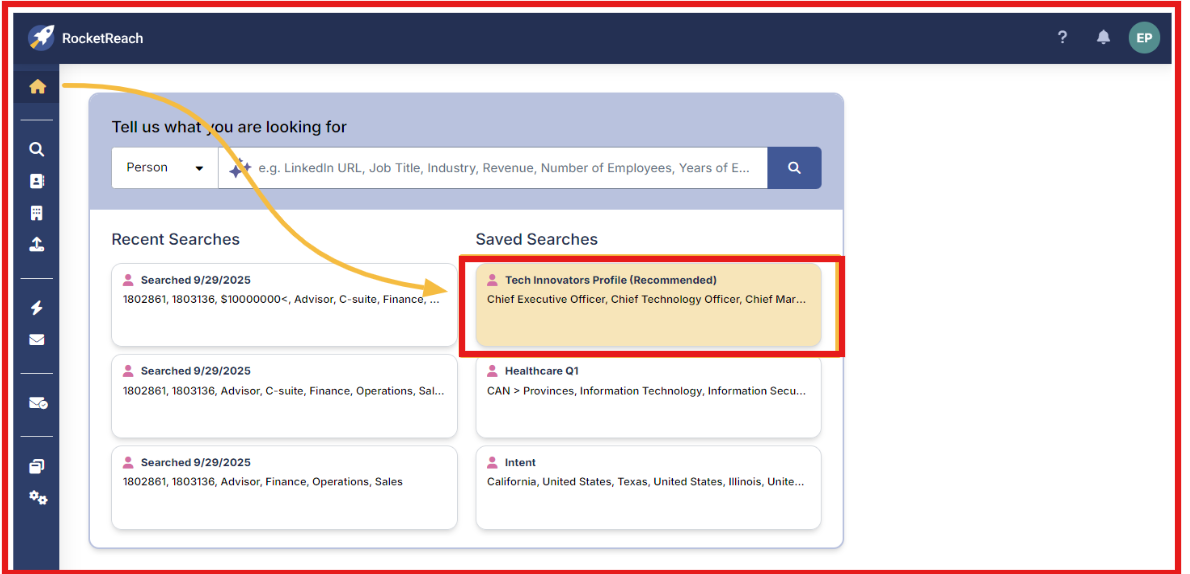
RocketReach offers a feature called AI-powered recommendations.
Instead of searching for every prospect manually, the platform suggests similar profiles based on previous searches.
For example, when I searched for a contact or company, RocketReach showed other profiles with similar job titles, companies, or locations.
It also studies how users search and view contacts. Based on those patterns, it recommends profiles that are often viewed together.
RocketReach says these recommendations are based on large search activity across its dataset.
However, these recommendations focus mostly on individual contacts.
In most cases, I still had to decide manually which companies to target next.
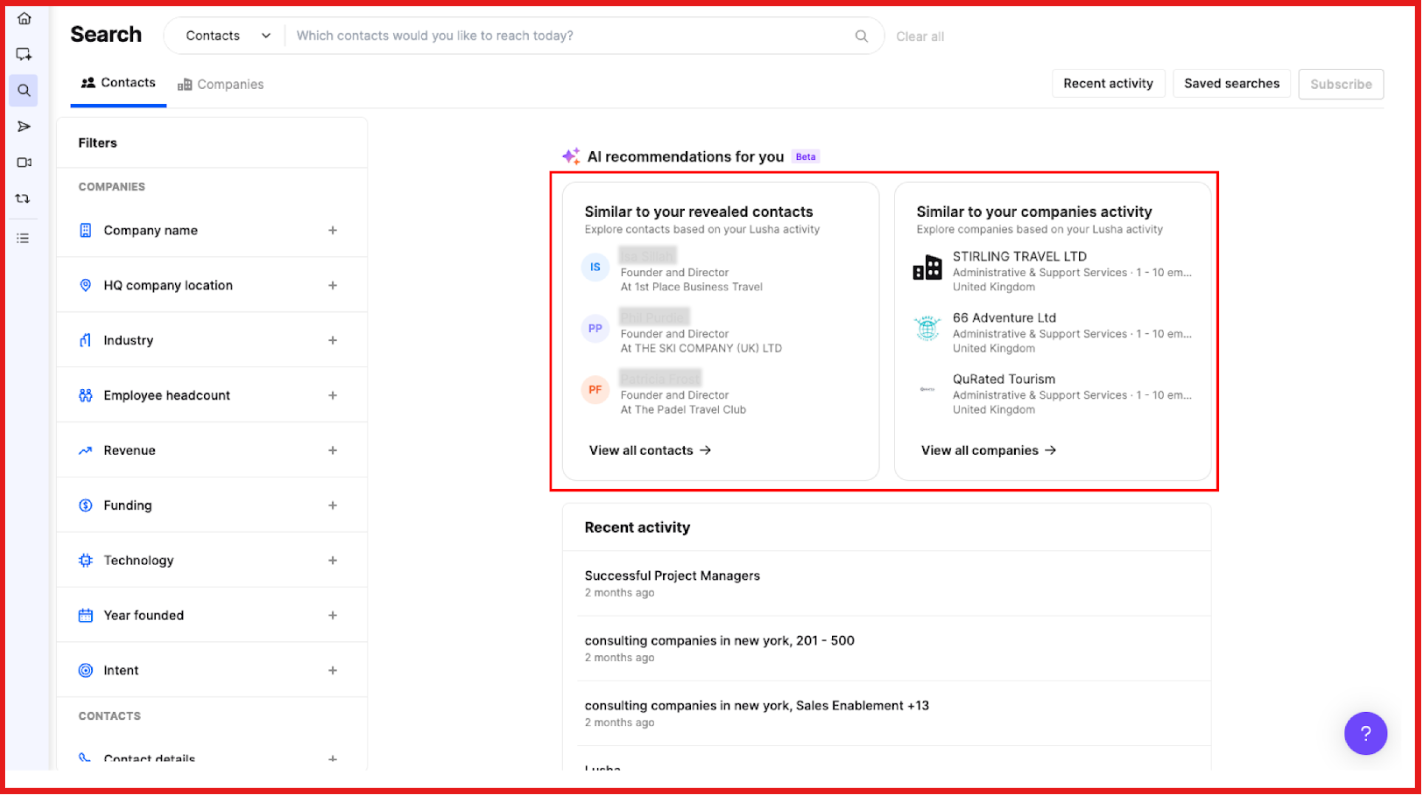
Lusha handles lookalikes at the company level.
Instead of recommending similar contacts, it analyzes existing accounts or customer lists to find companies with similar characteristics.
For example, I could upload accounts or pull them directly from a CRM.
Lusha then enriches those companies with data like industry, company size, location, and revenue range.
Based on this data, the platform generates lookalike companies that match similar patterns.
However, when expanding target accounts, I sometimes prefer tools that make lookalike discovery simpler.
Tools like Leadsforge focus directly on finding company lookalikes.
Instead of uploading account lists, I can enter a company name or domain to find similar companies.
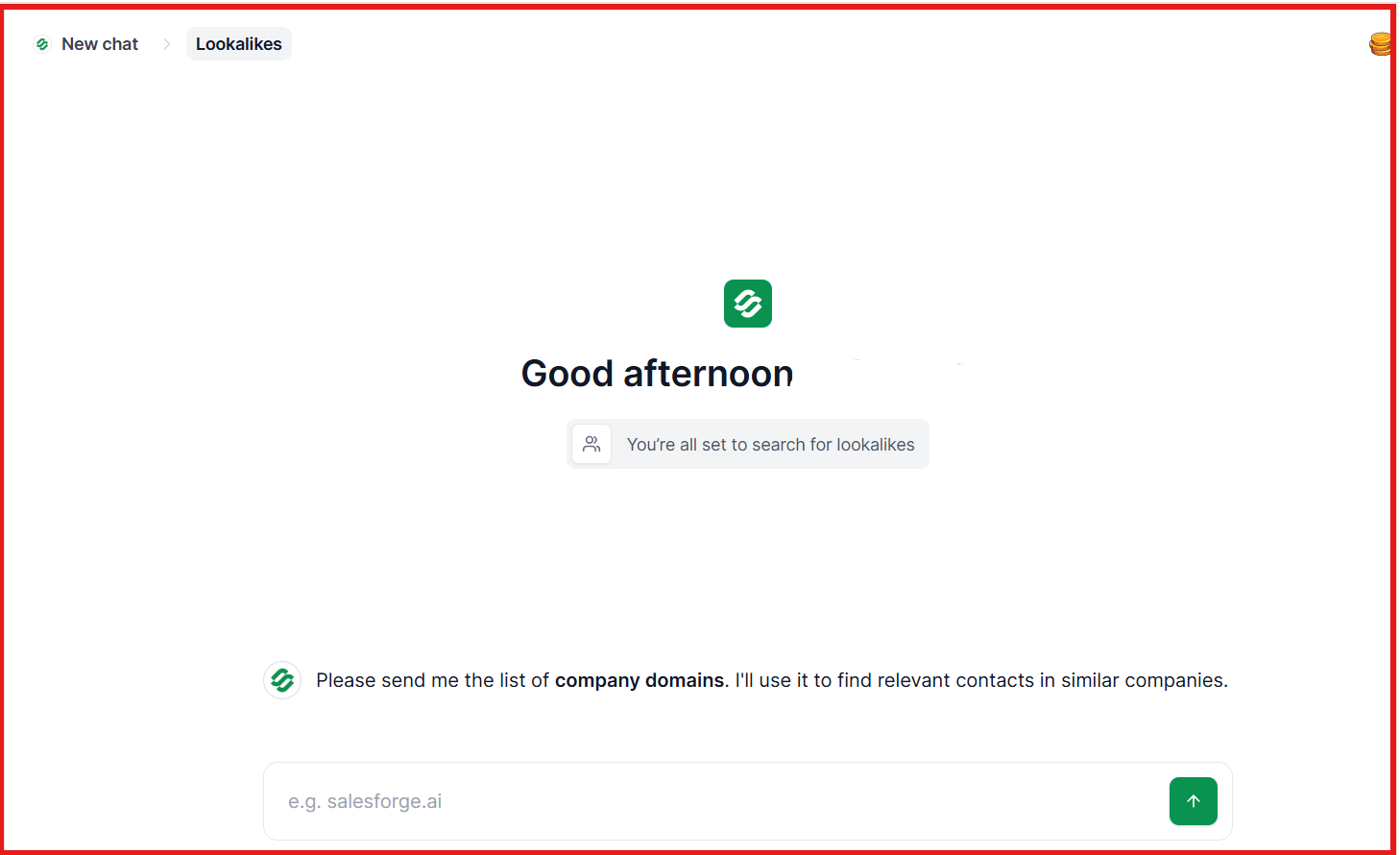
Leadsforge then shows lookalike companies and enriches them with contact details.
This makes it easier to find decision-makers.
Because of this, I can expand my target account list faster and move directly into prospecting.
Since a lot of prospecting starts on LinkedIn, I also tested how each Chrome extension worked while finding contacts.
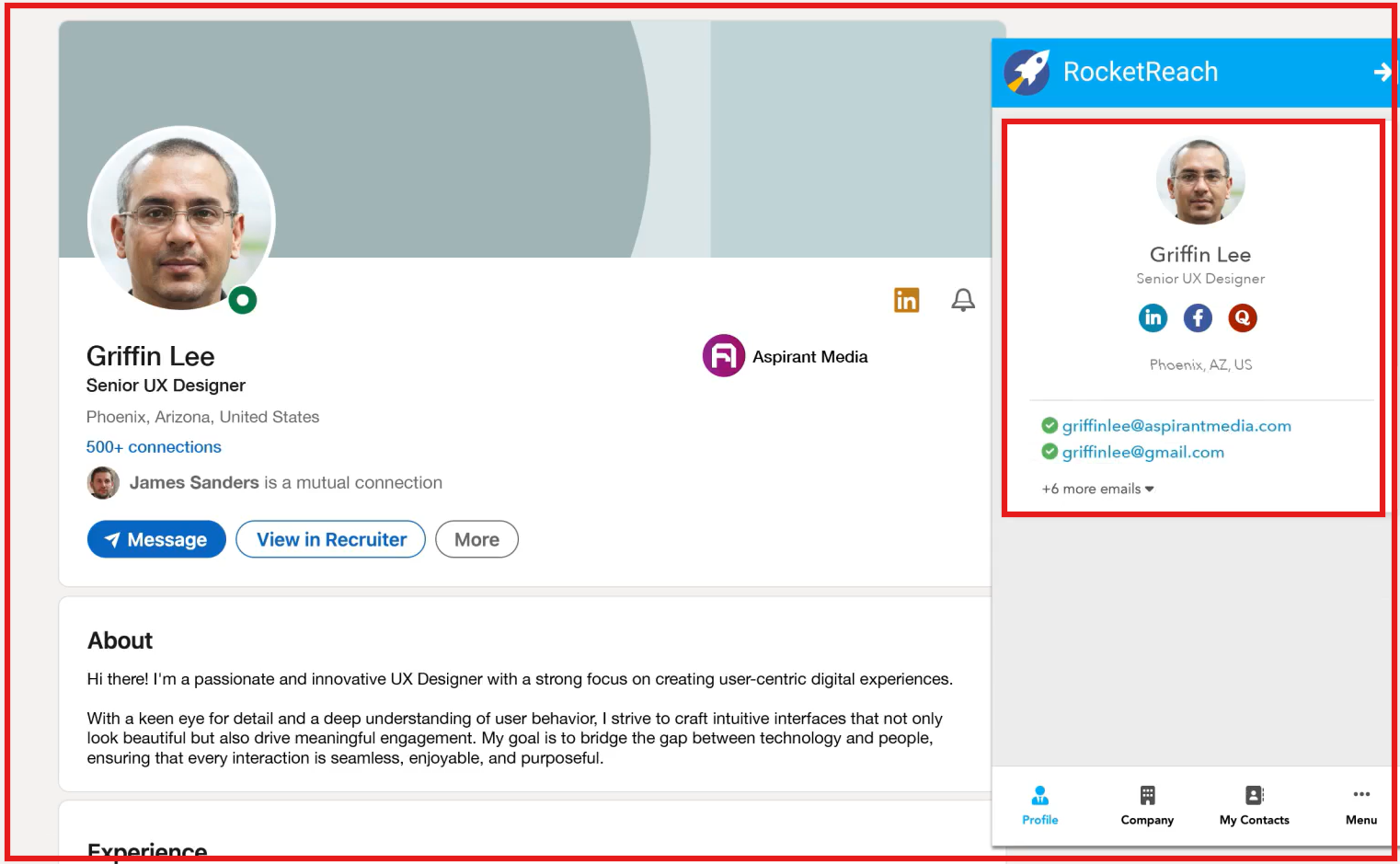
RocketReach offers a Chrome extension that works on LinkedIn and many company websites.
When I opened a LinkedIn profile or company page, the extension showed emails, phone numbers, and social links for that contact.
RocketReach says emails are SMTP-verified, which helps improve contact accuracy.
However, the extension mainly focuses on finding individual contacts, not building larger prospect lists.
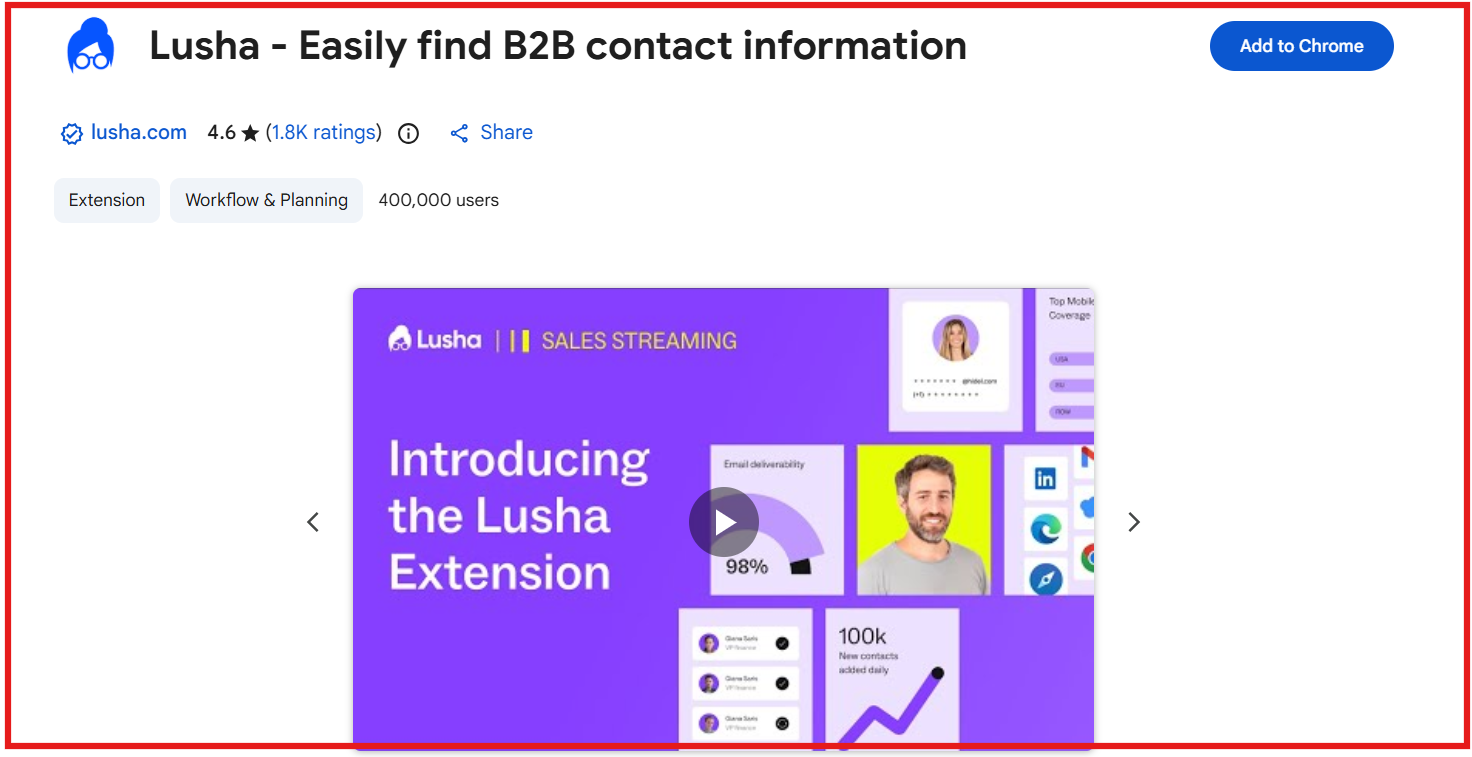
Lusha also provides a Chrome extension designed mainly for LinkedIn prospecting.
When I opened a LinkedIn or Sales Navigator profile, the extension showed verified emails, mobile numbers, and company details.
It also displayed company insights like industry, company size, revenue, funding, and job changes.
Contacts can be saved to lists, exported to CRM, or added directly to outreach sequences.
Because of this, Lusha’s extension works well for finding and enriching contacts directly during LinkedIn research.
Winner: Lusha - Its extension is more focused on LinkedIn prospecting and contact enrichment.
Building prospect lists is useful, but sales teams also need a simple way to export contacts and work with large datasets.
So I also checked how both tools handle bulk list building and data export.
RocketReach allows users to build prospect lists using its search filters and list generation tools.
I could create lists by searching contacts or by uploading files with company names or LinkedIn profiles.
The platform then matched those records and returned available contact details.
Once the list was ready, contacts could be exported for outreach or CRM workflows.
This makes RocketReach useful when building large prospect lists from different data sources.
Lusha also supports bulk prospect list building, but its workflow focuses more on data enrichment and CRM syncing.
For example, I could run a prospect search and save contacts directly into lists.
Lusha can also enrich multiple contacts at once, adding details like emails, phone numbers, job titles, and company data.
Another useful feature is direct export to CRM platforms, which helps move prospects into sales workflows quickly.
Because of this, Lusha works well when teams want to build lists and push contacts directly into CRM or outreach tools.
Winner: RocketReach - Its list generation tools make it easier to build large prospect lists.
Pricing matters because prospecting costs can rise fast once the team starts pulling more contacts.
So I compared how RocketReach, Lusha, and Leadsforge price their plans and what you get for that spend.
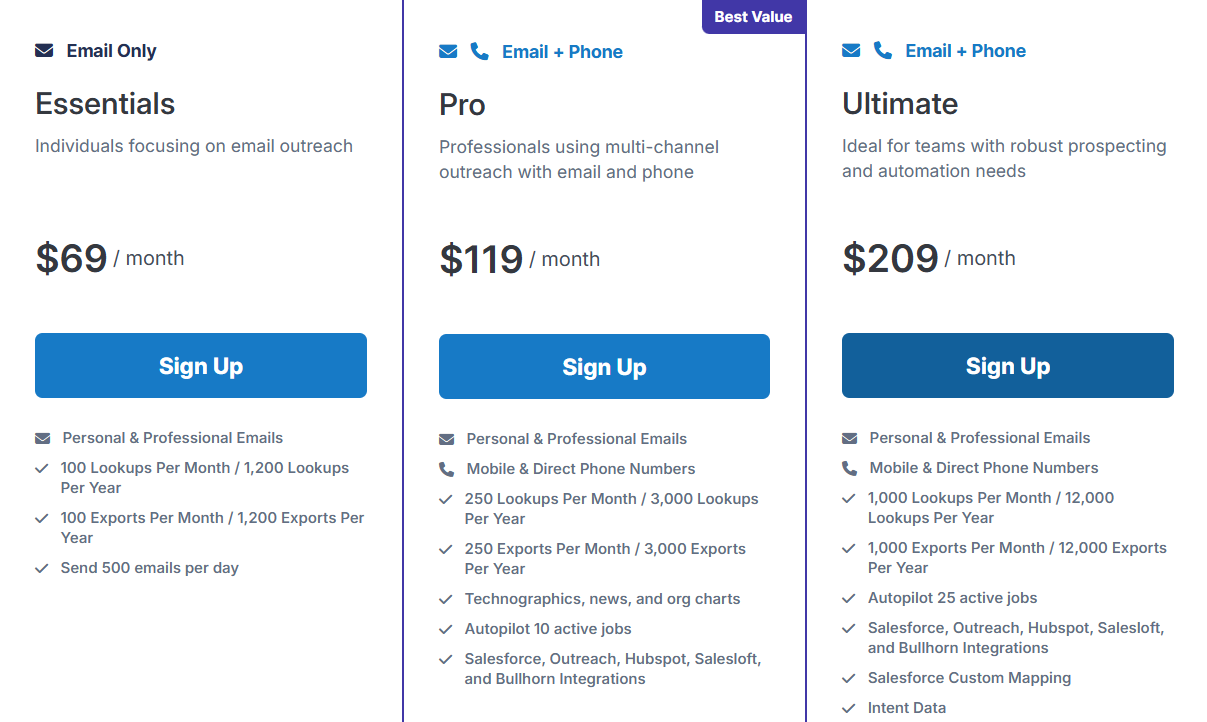
RocketReach uses a per-user pricing model.
Its monthly plans start at $69/month for Essentials, which includes 100 lookups and 100 exports per month.
The Pro plan costs $119/month and includes 250 lookups and 250 exports per month plus phone numbers.
The Ultimate plan costs $209/month and includes 1,000 lookups and 1,000 exports per month.
RocketReach does offer a free account with 5 free lookups, and annual billing shows yearly lookup totals.
From what I saw, RocketReach can get expensive quickly if a team needs more users or more contact volume.
Lusha uses a credit-based pricing model.
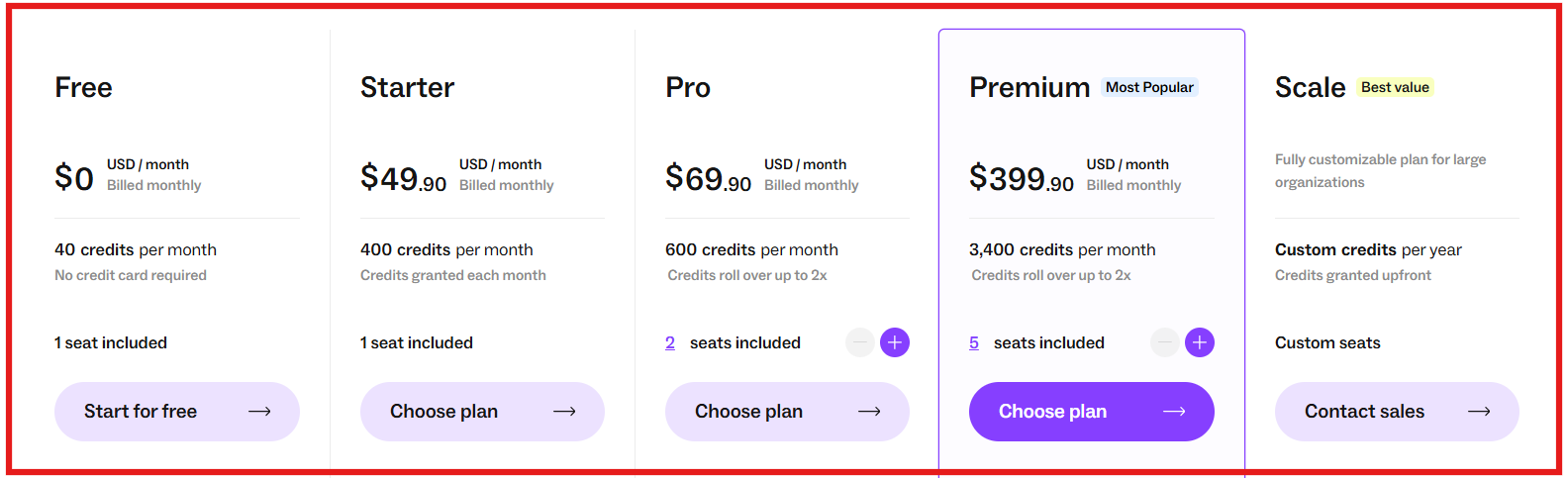
The Free plan gives 40 credits per month.
Starter costs $49.90/month and includes 400 credits per month.
Pro costs $227.40/month and includes 2,000 credits per month with 2 seats included.
Premium costs $399.90/month and includes 3,400 credits per month with 5 seats included.
Lusha also charges credits by action. For example, 1 verified email uses 1 credit, while 1 phone number uses 5 credits.
Because of this model, credits can run out quickly when teams reveal many contacts.
However, when comparing starting price against included credits, some prospecting tools offer higher credit volume at the same price.
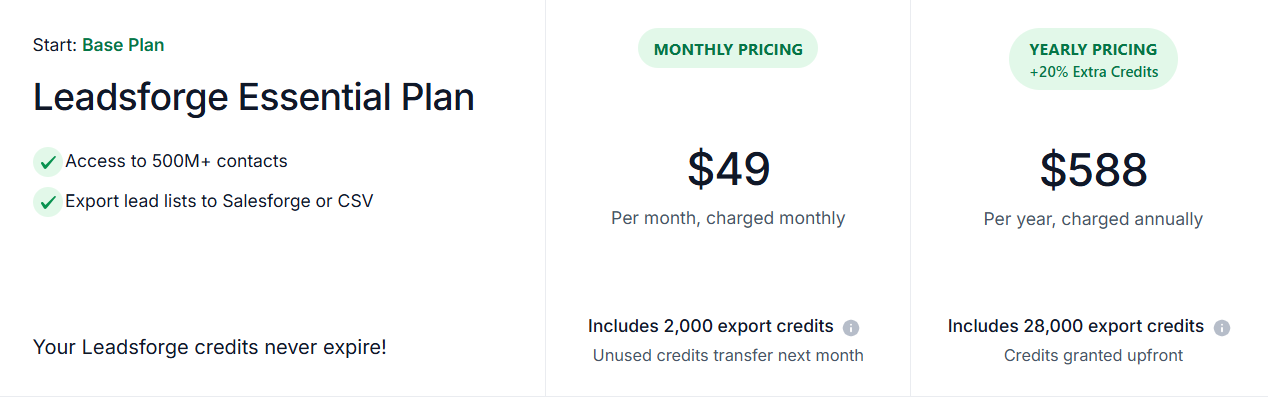
For example, Leadsforge starts at $49/month and includes 2,000 export credits.
While Lusha Starter at a similar price includes 400 credits per month.
Leadsforge unused credits also do not expire.
Because of this, Leadsforge can offer more prospecting volume for the same price.
Sales teams usually connect prospecting tools with CRMs and other sales platforms, so integrations are important.
So I checked how RocketReach and Lusha connect with common sales tools.
RocketReach supports integrations with several CRM and sales engagement tools.
These include Salesforce, HubSpot, Outreach, Salesloft, and Bullhorn.
The platform also provides API access, which allows teams to connect RocketReach data with internal tools or workflows.
Because of these integrations, RocketReach can easily fit into CRM-based prospecting workflows.
Lusha also supports CRM integrations and data exports.
Contacts can be exported directly to CRM systems or CSV files, which helps move prospects into outreach workflows.
Lusha also provides API access and webhooks, allowing teams to connect the platform with automation systems.
In addition, the extension works with tools like LinkedIn, Gmail, and Google Calendar, helping users enrich contact data during daily sales work.
Ease of use matters because prospecting tools are used every day. If the interface is complex, it can slow down list building and research.
So I also looked at how easy each platform feels during regular prospecting work.
RocketReach provides many features for finding contacts and companies.
However, the interface can feel a bit complex for new users, especially when using filters or navigating between search results and lists.
Some users also mention that refining searches or switching between views can take a few extra steps.
Overall, RocketReach works well once you understand the platform. But it can take some time to get comfortable with the workflow.
Lusha feels more straightforward during daily prospecting.
The interface is simple, and the LinkedIn Chrome extension allows users to pull contact data directly from profiles.
Contacts can also be saved to lists or exported to CRM systems easily, which helps keep the workflow organized.
Because of this, Lusha generally feels easier to use when doing LinkedIn-based prospecting.
However, when simplicity is the priority, some tools reduce the need for complex filters altogether.
For example, Leadsforge uses a chat-style search interface.

Instead of selecting many filters, I can simply describe my ideal customer in plain language and generate a lead list.
Because of this approach, Leadsforge is easier to use when building prospect lists quickly.
Enter your email to get a custom plan & stack recommendation for your business
Please check your mailbox in 5 minutes

RocketReach and Lusha both help sales teams find contact data and build prospect lists.
RocketReach works well when you want to search a very large contact database.
Lusha is more focused on LinkedIn prospecting and direct phone numbers. It is useful for teams that rely heavily on LinkedIn research.
However, both tools still require manual searches, filters, and credits to build prospect lists.
When the goal is building lists faster, I prefer tools that make the process simpler.
For example, Leadsforge lets me describe my ideal customer in a chat style interface and generate a lead list instantly.
The platform then enriches the list with emails, LinkedIn profiles, and phone numbers.
Once the list is ready, I export those leads and launch outreach in Salesforge.
Before sending campaigns, I prepare inboxes using Warmforge and set up mailboxes through Mailforge or Primeforge.
This setup connects lead discovery, outreach, and deliverability in one workflow.
If your goal is to build lead lists quickly, you can try Leadsforge.